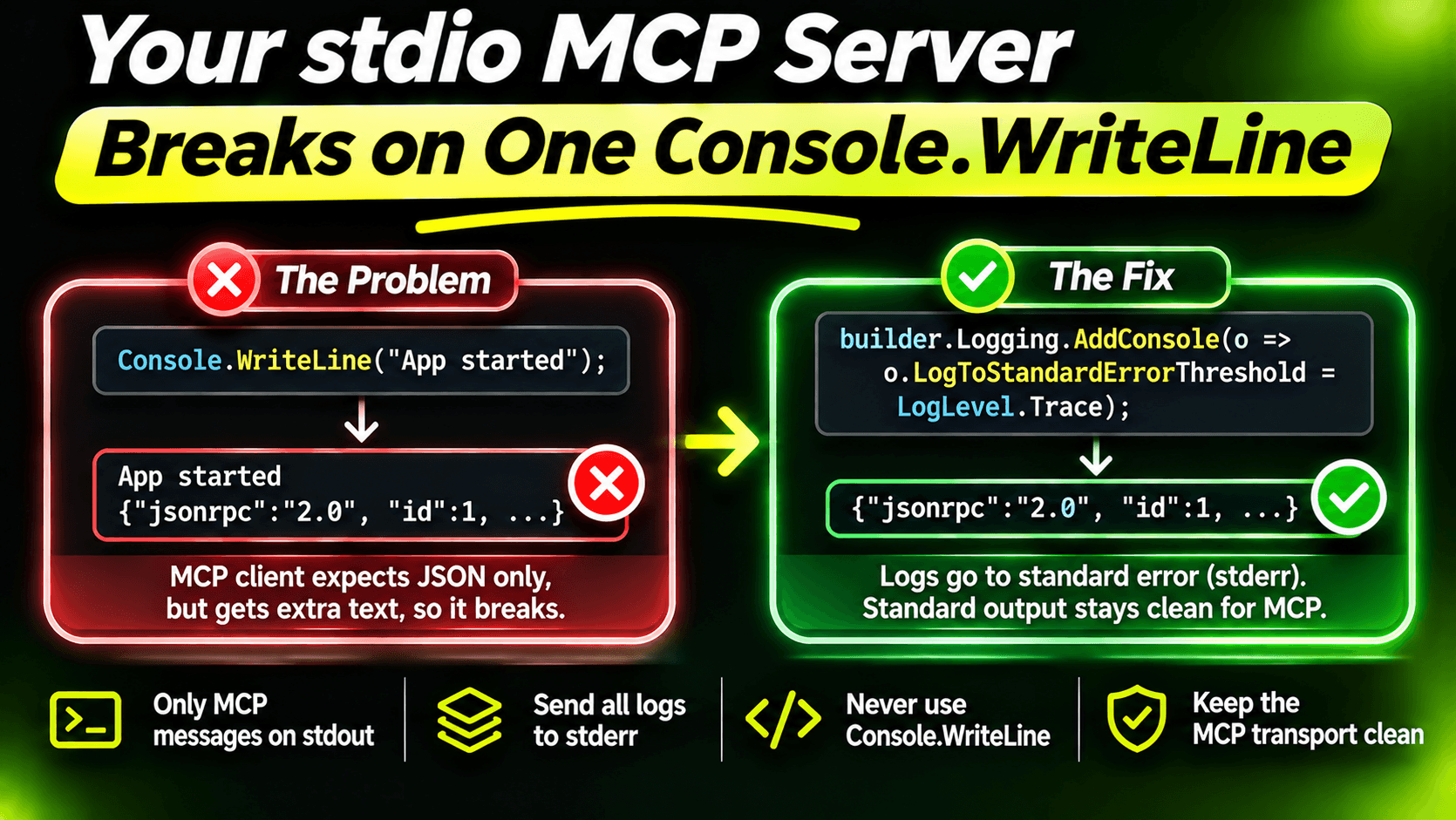
The first MCP server most people write works perfectly in a test and fails the moment a real client starts it. The client shows something vague like "connection closed" or "server disconnected", and the server logs look fine. Very often the cause is one line:
Console.WriteLine($"Looking up ticket {ticketNumber}");Why one line breaks everything
With the stdio transport, the client starts your server as a child process and talks to it over stdin and stdout. Every message is JSON-RPC. stdout isn't your console anymore. It's the wire.
So when your code writes "Looking up ticket 42" to stdout, the client reads it as a protocol message, fails to parse it, and gives up on the connection. Nothing crashed in your server. You just spoke out of turn.
The obvious Console.WriteLine is easy to find. The hidden ones aren't:
- The default console logger writes to stdout.
- A library you use prints a banner or a warning on startup.
- Your ORM logs SQL at Information level.
- A debug helper someone left in a tool method.
The fix: logs go to stderr
stderr is free. MCP clients usually show it in their logs, and it never touches the protocol. Here's a minimal server set up that way:
using System.ComponentModel;
using Microsoft.Extensions.DependencyInjection;
using Microsoft.Extensions.Hosting;
using Microsoft.Extensions.Logging;
using ModelContextProtocol.Server;

var builder = Host.CreateApplicationBuilder(args);

builder.Logging.AddConsole(options =>
{
    // Send every log level to stderr. stdout belongs to the protocol.
    options.LogToStandardErrorThreshold = LogLevel.Trace;
});

builder.Services
    .AddMcpServer()
    .WithStdioServerTransport()
    .WithToolsFromAssembly();

await builder.Build().RunAsync();

[McpServerToolType]
public sealed class TicketTools(ILogger<TicketTools> logger)
{
    [McpServerTool, Description("Gets a support ticket by its number.")]
    public string GetTicket(int ticketNumber)
    {
        logger.LogInformation("Looking up ticket {TicketNumber}", ticketNumber);
        return $"Ticket {ticketNumber}: Printer on 3rd floor is offline. Status: Open.";
    }
}
Two changes from the broken version. LogToStandardErrorThreshold set to Trace means all log levels go to stderr. And the tool uses an injected ILogger instead of Console.WriteLine, so its output follows the same rule.
A safety net for code you don't control
Logging config covers your logs. It doesn't cover a third-party library that calls Console.WriteLine directly. For that, I add one line at the very top of Program.cs:
Console.SetOut(Console.Error);After this, anything written through Console.Out lands on stderr. The MCP SDK writes protocol messages to the raw stdout stream, not through Console.Out, so the protocol keeps working while stray prints get moved out of the way. Test this with your SDK version before relying on it: the whole trick depends on that detail.
How to see what's actually on the wire
Don't debug this through your AI client. Its error messages are too vague. Use the MCP Inspector:
npx @modelcontextprotocol/inspector dotnet path/to/YourServer.dllIt starts your server, connects as a client, and shows you every message. If something non-JSON appears on stdout, you'll see it immediately instead of guessing.
A related habit: point your client at the built DLL or published executable rather than dotnet run. It starts faster, and you avoid surprises from anything the build step prints.
The rule to remember
In a stdio MCP server, stdout is not for humans. Treat every write to it as a protocol message, send everything else to stderr, and check the wire with the Inspector when a client says it can't connect. That's the first bug almost everyone hits. Now you won't.
Want the full build? Build MCP Servers in C#: Connect AI to Your .NET Apps shows you how to give AI access to your own .NET apps with an MCP server. Or get the weekly tips by email: /newsletter.