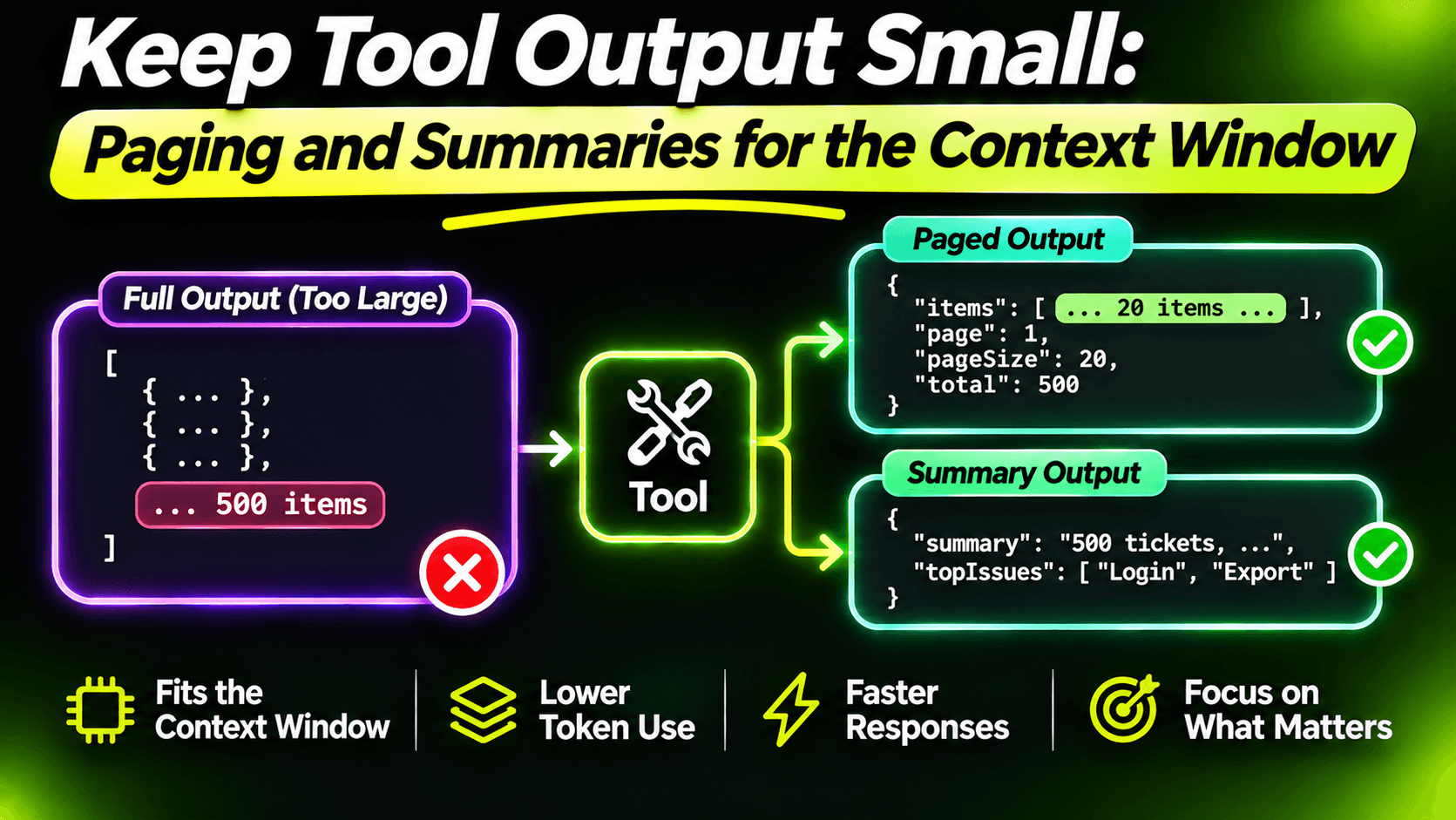
Every tool result goes into the model's context. Not a summary of it, the whole thing. A search tool that returns 400 tickets with full descriptions and comment threads can put tens of thousands of tokens into the conversation in one call.
That costs money, but money isn't the worst part. Long contexts make models worse at the job. Instructions from the start of the conversation get less attention, details in the middle of a huge result get missed, and the next tool call is chosen based on a wall of text nobody needed. Small, focused results make better agents.
Return what the task needs, not what the database has
This started in the eighth post: tools return a view built for the agent, not an entity. For a search, that means number, title and status. Not the description, not the comments, not twelve timestamps. If the model needs more about one ticket, get_ticket is one call away.
Page with a cursor, not a page number
Even a lean list gets too long if it has no limit. So every list tool returns a fixed number of items and tells the model how to get more:
public sealed record TicketPage(IReadOnlyList<TicketSummary> Tickets, string? NextCursor);

[McpServerTool(Name = "search_tickets", ReadOnly = true)]
[Description("""
    Searches support tickets by words in the title, newest first. Returns up to 10 per call.
    If nextCursor is not null, more results exist: call again with the same query and that cursor.
    Prefer a more specific query over paging through many results.
    """)]
public async Task<TicketPage> SearchTickets(
    [Description("Words from the ticket title, e.g. 'printer offline'.")]
    string query,
    [Description("The nextCursor from a previous call. Omit for the first page.")]
    string? cursor = null,
    CancellationToken cancellationToken = default)
{
    const int pageSize = 10;
    var after = TicketCursor.Decode(cursor);

    var tickets = db.Tickets.AsNoTracking().Where(t => t.Title.Contains(query));

    if (after is not null)
    {
        tickets = tickets.Where(t =>
            t.CreatedAt < after.CreatedAt ||
            (t.CreatedAt == after.CreatedAt && t.Id < after.Id));
    }

    var rows = await tickets
        .OrderByDescending(t => t.CreatedAt)
        .ThenByDescending(t => t.Id)
        .Take(pageSize + 1)
        .Select(t => new { t.Id, t.CreatedAt, t.Number, t.Title, t.Status })
        .ToListAsync(cancellationToken);

    var page = rows
        .Take(pageSize)
        .Select(r => new TicketSummary(r.Number, r.Title, r.Status))
        .ToList();

    var nextCursor = rows.Count > pageSize
        ? TicketCursor.Encode(rows[pageSize - 1].CreatedAt, rows[pageSize - 1].Id)
        : null;

    return new TicketPage(page, nextCursor);
}
The cursor is a small opaque string:
public sealed record TicketCursor(DateTime CreatedAt, int Id)
{
    public static string Encode(DateTime createdAt, int id) =>
        Convert.ToBase64String(Encoding.UTF8.GetBytes($"{createdAt.Ticks}:{id}"));

    public static TicketCursor? Decode(string? cursor)
    {
        if (string.IsNullOrEmpty(cursor))
        {
            return null;
        }

        try
        {
            var parts = Encoding.UTF8.GetString(Convert.FromBase64String(cursor)).Split(':');
            return new TicketCursor(new DateTime(long.Parse(parts[0]), DateTimeKind.Utc), int.Parse(parts[1]));
        }
        catch (Exception ex) when (ex is FormatException or IndexOutOfRangeException)
        {
            throw new McpException("The cursor is invalid. Search again without a cursor.");
        }
    }
}
Why a cursor and not "page 2"? Tickets keep arriving while the agent works. With page numbers, a new ticket at the top shifts everything down, and the model sees one ticket twice and misses another. A cursor says "continue after this exact ticket", so new arrivals don't disturb the paging. It's also faster on big tables, because the database doesn't count and skip rows.
Fetching one row more than the page size is a cheap way to know whether there's a next page without a separate count query. And notice the last line of the description: often the best next step isn't page 2, it's a better search. Saying so in the description nudges the model to narrow down instead of reading everything.
Trim long text, and say that you did
Some fields are long by nature: ticket descriptions, comment bodies, email threads. When get_ticket returns the last five comments, each one is clipped:
static string Clip(string text, int max = 500) =>
    text.Length <= max
        ? text
        : $"{text[..max]}... [{text.Length - max} more characters]";
The marker at the end matters. A silently cut sentence looks complete, and the model will reason from half a message. "[1,240 more characters]" tells it there's more, the same honesty principle as the error messages in the ninth post.
Answer "how many" with a count, not a list
This one surprises people. Ask an agent "how many printer tickets were opened this week?" with only a search tool, and it will page through results and count them in its head. That's slow, expensive, and often wrong: models are not reliable at counting long lists.
Give it a tool that does the counting in the database:
[McpServerTool(Name = "count_tickets", ReadOnly = true)]
[Description("""
    Counts tickets by status, optionally only tickets created in the last N days.
    Use this for "how many" questions instead of searching and counting results.
    """)]
public async Task<Dictionary<string, int>> CountTickets(
    [Description("Only count tickets created in the last N days. Omit to count all.")]
    int? createdInLastDays = null,
    CancellationToken cancellationToken = default)
{
    var tickets = db.Tickets.AsNoTracking();

    if (createdInLastDays is int days)
    {
        var since = DateTime.UtcNow.AddDays(-days);
        tickets = tickets.Where(t => t.CreatedAt >= since);
    }

    return await tickets
        .GroupBy(t => t.Status)
        .Select(g => new { Status = g.Key, Count = g.Count() })
        .ToDictionaryAsync(x => x.Status.ToString(), x => x.Count, cancellationToken);
}
A few dozen tokens instead of a few thousand, and a correct answer. Whenever you notice the model doing math or counting over tool results, that's a sign a small aggregate tool is missing.
Put a budget in your tests
Output size creeps up. Someone adds a field, then another, and six months later search_tickets returns three times what it used to. Nobody notices, because nothing fails.
So make it fail. With the in-memory test setup from the twelfth post, add a test that calls the tool with a realistic query and checks the size of what the client receives:
[Fact]
public async Task Search_results_stay_within_budget()
{
    var result = await fixture.Client.CallToolAsync(
        "search_tickets",
        new Dictionary<string, object?> { ["query"] = "printer" },
        cancellationToken: TestContext.Current.CancellationToken);

    var text = string.Concat(result.Content.OfType<TextContentBlock>().Select(c => c.Text));

    // Roughly 4 characters per token: keep one page under ~1,000 tokens.
    Assert.True(text.Length < 4_000, $"search_tickets returned {text.Length} characters.");
}
The exact number matters less than having one. When the test fails, someone has to decide on purpose whether the extra size is worth it.
Summary
Return views, not entities. Limit every list and page with a cursor. Clip long text and mark it. Count in the database, not in the model. And put a size budget in your tests, because context is a resource like memory or CPU, and every tool result spends it.
Want the full build? Build MCP Servers in C#: Connect AI to Your .NET Apps shows you how to give AI access to your own .NET apps with an MCP server. Or get the weekly tips by email: /newsletter.