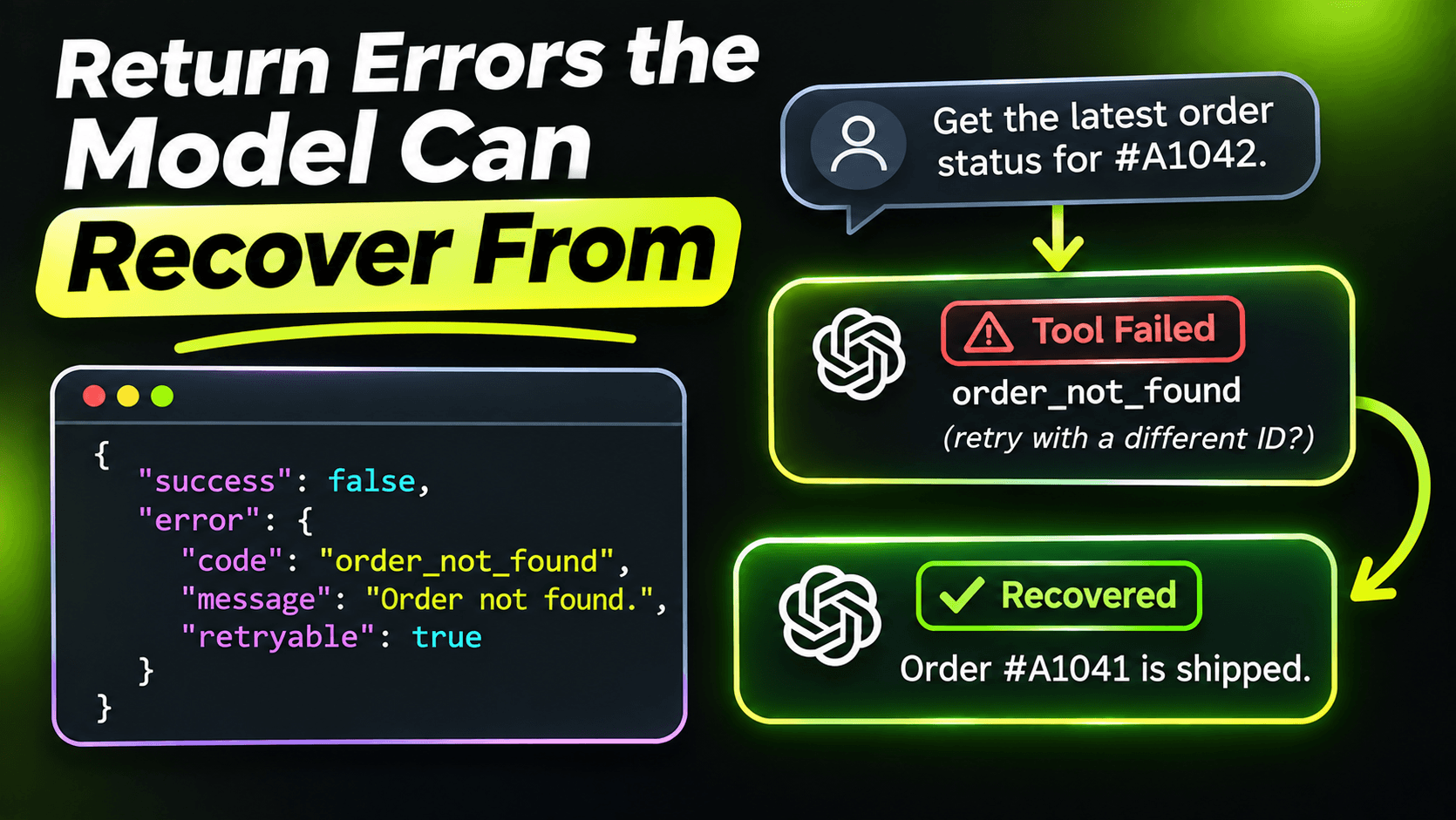
When a tool call fails, the model reads the error and decides what to do next. Try again, try a different tool, ask the user, or give up. That decision is only as good as the error message it gets.
And in a default C# MCP server, the message it gets is usually this:
An error occurred invoking 'resolve_ticket'.No reason, no hint. So the model guesses. Often it retries the exact same call, or worse, tells the user the ticket was resolved.
Three ways a tool can fail
The MCP C# SDK handles exceptions thrown from your tool methods in three different ways, and it's worth knowing all three:
- McpException: the SDK returns a tool result with isError set to true, and your exception message is included. The model reads it.
- McpProtocolException: this isn't a tool error at all. It becomes a JSON-RPC protocol error, meant for problems with the request itself. Depending on the client, the model may never see it.
- Any other exception: the SDK also returns isError true, but with a generic message. Your ArgumentException, your EF Core exception, your custom domain exception: the model sees none of their text.
That last rule is deliberate and good. You don't want stack traces, SQL or connection strings sent to a model and possibly shown to a user. But it means that if you want the model to understand a failure, you have to say so explicitly with McpException.
Translate failures into instructions
Here's the resolve_ticket tool from the previous post, with real error handling:
[McpServerTool(Name = "resolve_ticket")]
[Description("""
    Marks a ticket as resolved and records how it was fixed.
    Use this only after the user has confirmed the problem is solved.
    """)]
public async Task<TicketView> ResolveTicket(
    [Description("The ticket number in the format SD-1234.")]
    string ticketNumber,
    [Description("One or two sentences explaining what fixed the problem.")]
    string resolutionNote)
{
    if (!TicketNumber.IsValid(ticketNumber))
    {
        throw new McpException(
            $"'{ticketNumber}' is not a valid ticket number. Use the format SD-1234.");
    }

    try
    {
        return await tickets.ResolveAsync(ticketNumber, resolutionNote);
    }
    catch (TicketNotFoundException)
    {
        throw new McpException(
            $"Ticket {ticketNumber} doesn't exist. " +
            "If you don't have the exact number, use search_tickets to find it first.");
    }
    catch (TicketAlreadyClosedException ex)
    {
        throw new McpException(
            $"Ticket {ticketNumber} was already closed on {ex.ClosedAt:yyyy-MM-dd}. " +
            "There is nothing to resolve. Tell the user instead of retrying.");
    }
    catch (TimeoutException ex)
    {
        logger.LogWarning(ex, "Ticket store timed out resolving {Ticket}", ticketNumber);
        throw new McpException(
            "The ticket system didn't respond in time. This is usually temporary. You can try once more.");
    }
}
Each message follows the same pattern: what happened, and what to do about it. Read them as the model would. "Use search_tickets to find it first" points to the next step. "Tell the user instead of retrying" stops a retry loop before it starts. "You can try once more" allows exactly one retry, not ten.
Anything not caught here falls through to the generic message. That's fine. Unknown failures shouldn't be explained by guessing, and the full exception still goes to your logs.
Bad input is a tool error, not a protocol error
It's tempting to throw McpProtocolException with InvalidParams when the model sends a malformed ticket number. Technically the parameter is invalid. But a protocol error is for a broken request, like an unknown tool or arguments that don't match the schema. A ticket number in the wrong format is a mistake the model can fix, and it can only fix it if it sees the message. So validation errors go through McpException, as in the first check above.
Empty results are errors in disguise
In the seventh post, get_ticket returned null for a missing ticket. I'd change that now. An empty result is ambiguous: did the ticket not exist, did the tool fail, or is there just nothing to show? Models fill that gap with assumptions. A clear "Ticket SD-9999 doesn't exist" leaves nothing to assume.
The same goes for searches. "No tickets matched 'printer offline'. Try fewer or different words." is a much better result than an empty list.
Rules for writing tool errors
- Say what happened in plain words. Not an error code, not an exception type.
- Say what to do next: a different tool, a corrected format, asking the user.
- Say whether retrying makes sense. Models retry by default. Tell them when not to.
- Never include internals. No stack traces, IDs from other systems, SQL or file paths. Log those; don't return them.
- Keep it short. One or two sentences. Error text lands in the context window like any other tool result.
Why this is worth the effort
Most agent failures I debug aren't the model being dumb. They're the model making a reasonable decision based on bad information. A tool that fails with a clear, honest message lets the agent recover on its own, and that's the difference between a demo that needs a human watching and a tool people can actually rely on.
Want the full build? Build MCP Servers in C#: Connect AI to Your .NET Apps shows you how to give AI access to your own .NET apps with an MCP server. Or get the weekly tips by email: /newsletter.