Most MCP servers I see are tested the same way: start the server, open an AI client, type a question, and see if the right thing happens. That's a fine way to try something once. It's a terrible way to know that last week's change didn't break anything, because the model in the middle adds randomness you can't control.
The good news: you can test an MCP server without any model at all. A tool call is a JSON-RPC message in and a result out. Test that, and save the model for a separate kind of test.
Three layers
I test MCP servers at three levels:
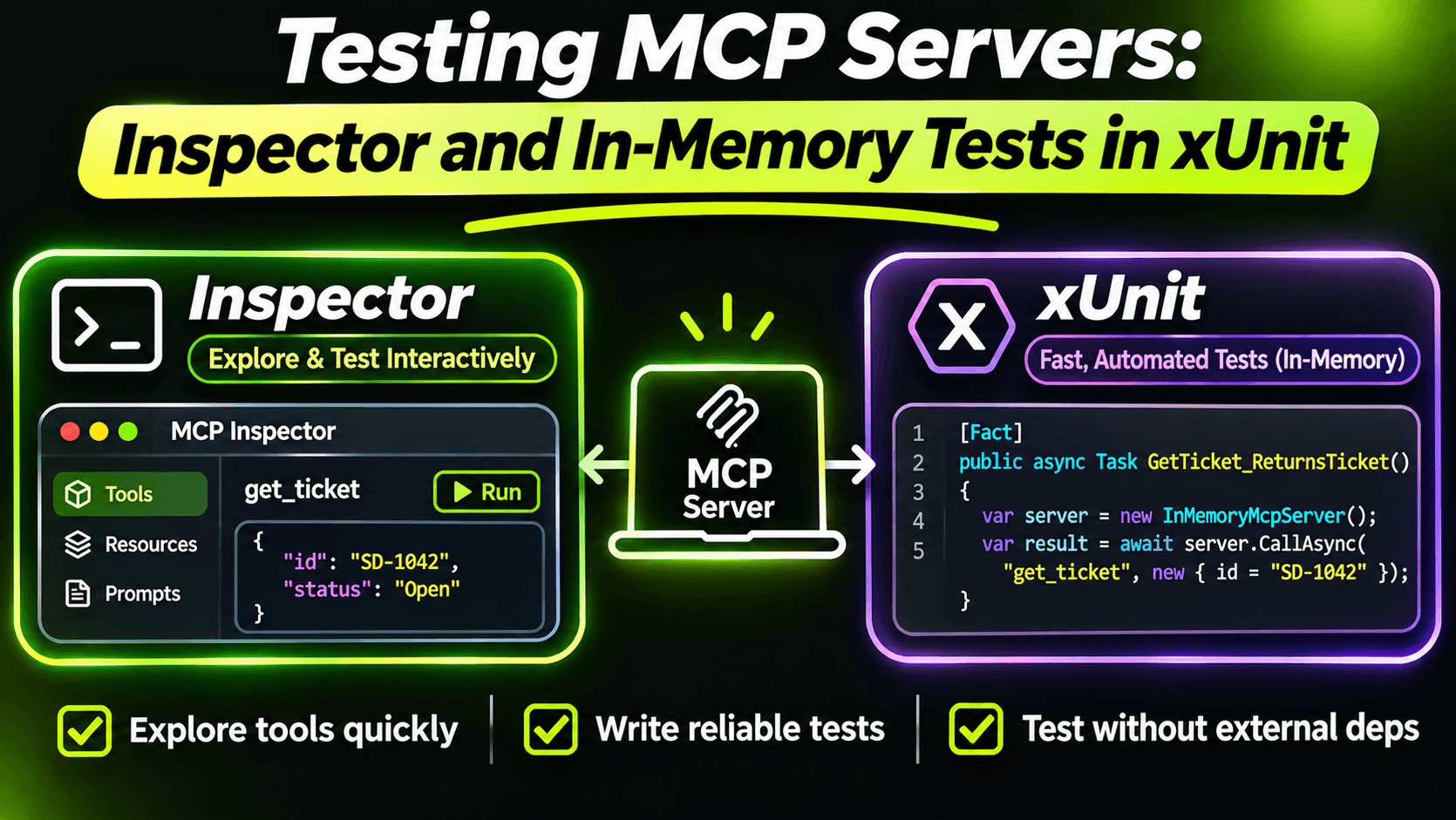
- Manual: the MCP Inspector. For exploring, debugging and reviewing descriptions.
- In-memory protocol tests. A real MCP client and a real MCP server in the same test process, connected by pipes. Fast, run in CI, catch most bugs.
- One real-process smoke test. Starts the actual executable over stdio. Catches the bugs only a real process has.
Plain unit tests for your services still matter too, but they don't test anything MCP-specific, so I'll skip them here.
Layer 1: the Inspector
We've used it throughout this series:
npx @modelcontextprotocol/inspector dotnet path/to/SupportDesk.Mcp.Stdio.dllIt lists your tools exactly as a client receives them, lets you call them by hand, and shows the raw messages. As I said in the seventh post, it's the best way to review your descriptions. But it's manual, so it doesn't protect you from regressions.
Layer 2: real client, real server, no network
The C# SDK can run a server over any pair of streams. In a test, we connect it to a client with two in-memory pipes. Here's an xUnit v3 fixture that does that, using the same AddSupportDeskTools registration as the real hosts from the tenth post, with a fake store swapped in:
using System.IO.Pipelines;
using Microsoft.Extensions.DependencyInjection;
using Microsoft.Extensions.Hosting;
using ModelContextProtocol.Client;

public sealed class SupportDeskMcpFixture : IAsyncLifetime
{
    private readonly Pipe _clientToServer = new();
    private readonly Pipe _serverToClient = new();
    private IHost _host = null!;

    public McpClient Client { get; private set; } = null!;
    public FakeTicketStore Tickets { get; } = new();

    public async ValueTask InitializeAsync()
    {
        var builder = Host.CreateApplicationBuilder();

        builder.Services.AddSupportDesk();
        builder.Services.AddSingleton<ITicketStore>(Tickets);

        builder.Services
            .AddMcpServer()
            .WithStreamServerTransport(
                _clientToServer.Reader.AsStream(),
                _serverToClient.Writer.AsStream())
            .AddSupportDeskTools();

        _host = builder.Build();
        await _host.StartAsync();

        Client = await McpClient.CreateAsync(new StreamClientTransport(
            _clientToServer.Writer.AsStream(),
            _serverToClient.Reader.AsStream()));
    }

    public async ValueTask DisposeAsync()
    {
        await Client.DisposeAsync();
        await _host.StopAsync();
        _host.Dispose();
    }
}
The fake store is registered after AddSupportDesk, so it replaces the real one. Everything else (DI, tool discovery, parameter binding, error handling) is the real thing.
Now the tests. First, the tool list itself:
public sealed class ToolContractTests(SupportDeskMcpFixture fixture)
    : IClassFixture<SupportDeskMcpFixture>
{
    [Fact]
    public async Task Exposes_exactly_the_expected_tools()
    {
        var tools = await fixture.Client.ListToolsAsync(cancellationToken: TestContext.Current.CancellationToken);

        Assert.Equal(
            new[] { "get_ticket", "resolve_ticket", "search_tickets" },
            tools.Select(t => t.Name).Order());

        Assert.All(tools, t => Assert.False(string.IsNullOrWhiteSpace(t.Description)));
    }
}
This looks almost too simple, but it's the test I'd keep if I could only keep one. Tool names are your public API. Clients, saved prompts and other people's agents depend on them. This test fails the moment someone renames a method without setting the tool name, or adds a tool nobody reviewed.
Next, behaviour. The ninth post was about errors the model can recover from, and that's exactly the kind of thing that quietly breaks in a refactor:
public sealed class ResolveTicketTests(SupportDeskMcpFixture fixture)
    : IClassFixture<SupportDeskMcpFixture>
{
    [Fact]
    public async Task Invalid_ticket_number_returns_a_readable_tool_error()
    {
        var result = await fixture.Client.CallToolAsync(
            "resolve_ticket",
            new Dictionary<string, object?>
            {
                ["ticketNumber"] = "1042",
                ["resolutionNote"] = "Restarted the printer."
            },
            cancellationToken: TestContext.Current.CancellationToken);

        Assert.True(result.IsError);
        var text = Assert.IsType<TextContentBlock>(Assert.Single(result.Content)).Text;
        Assert.Contains("SD-1234", text);
    }
}
Notice what this asserts: not that an exception was thrown inside C#, but what the client actually receives. If someone changes McpException to ArgumentException, the model would get a generic message, and this test catches it.
These tests run in milliseconds, need no Node, no Docker and no model, and run anywhere dotnet test runs.
Layer 3: one test with a real process
In-memory tests skip one thing: the real process. And the real process is where the bug from the sixth post lives. A stray Console.WriteLine in startup code breaks a stdio server, and no pipe-based test will notice.
So I keep one smoke test that starts the actual stdio host:
public sealed class StdioSmokeTests
{
    [Fact]
    public async Task Real_stdio_server_starts_and_lists_tools()
    {
        var transport = new StdioClientTransport(new StdioClientTransportOptions
        {
            Name = "supportdesk",
            Command = "dotnet",
            Arguments = ["SupportDesk.Mcp.Stdio.dll"]
        });

        await using var client = await McpClient.CreateAsync(
            transport, cancellationToken: TestContext.Current.CancellationToken);

        var tools = await client.ListToolsAsync(cancellationToken: TestContext.Current.CancellationToken);

        Assert.NotEmpty(tools);
    }
}
If anything writes to stdout before or during startup, this test fails. It's slower than the others, so one is enough.
What these tests don't cover
None of this tells you whether a model picks the right tool. That's a different question with a different kind of test: a list of realistic user requests and the tool you expect for each, run against a real model, scored over many runs rather than pass/fail. Keep it separate from your unit tests, so a slightly random model never makes your CI flaky.
The short version
Test your MCP server the way clients see it: tool names, schemas, results and errors, through a real client. In-memory pipes make that fast enough to run on every commit. Add one smoke test with the real process to catch stdout problems, and keep the Inspector for the moments when you need to look with your own eyes.
Want the full build? Build MCP Servers in C#: Connect AI to Your .NET Apps shows you how to give AI access to your own .NET apps with an MCP server. Or get the weekly tips by email: /newsletter.