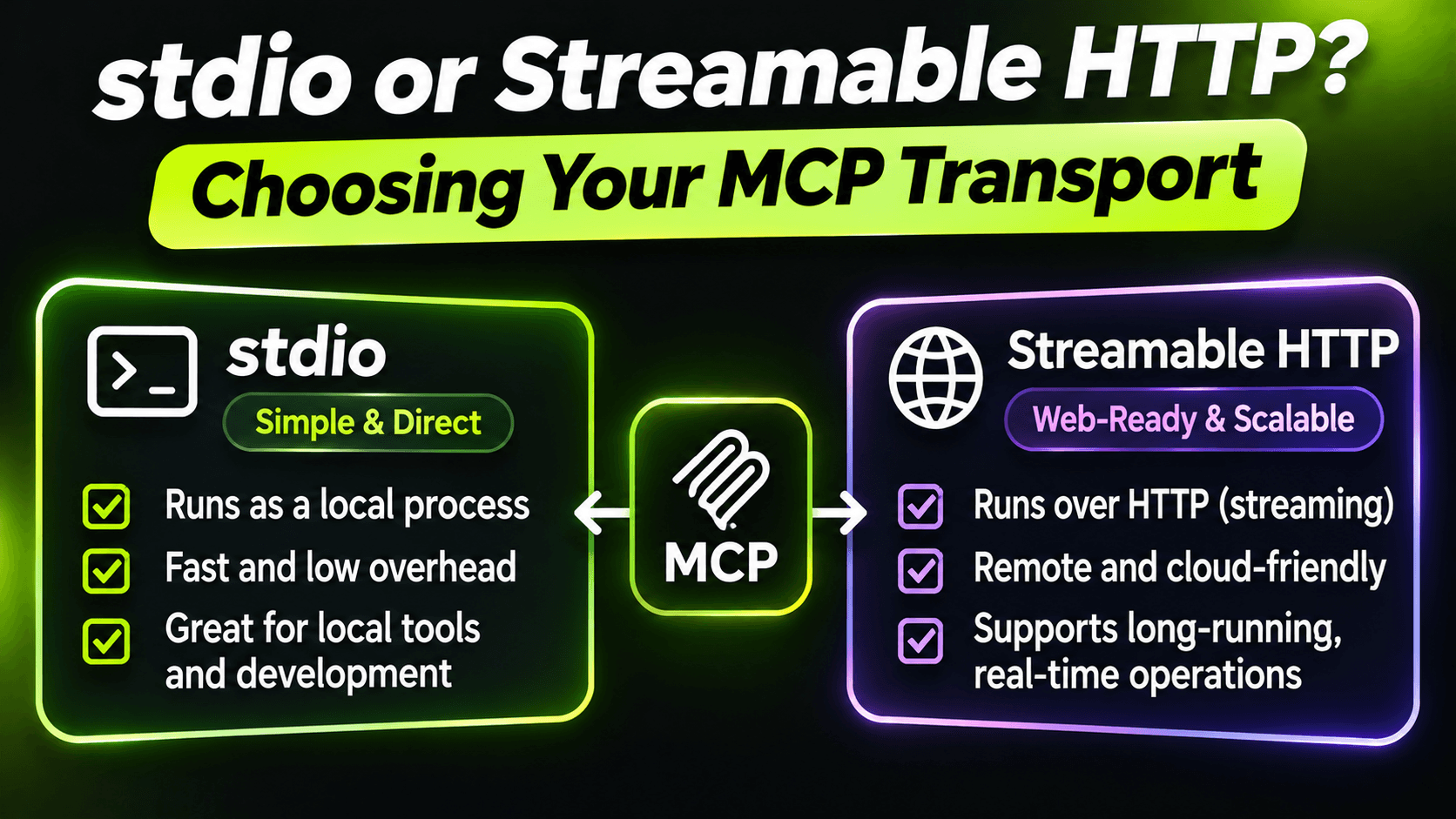
Every MCP server has to answer one question before the first tool runs: how does the client talk to it? The C# SDK gives you two answers. stdio, where the client starts your server as a local process. And Streamable HTTP, where your server runs somewhere and clients connect over the network.
They're not interchangeable. Picking the wrong one usually doesn't fail on day one. It fails later, when you try to share the server, secure it, or ship an update.
stdio: a process on the user's machine
With stdio, the client (an IDE, a desktop assistant, your own app) starts your server with a command, talks to it over stdin and stdout, and kills it when it's done.
That gives you a few things for free:
- No network. Nothing listens on a port, so there's nothing to attack from outside.
- The user's own permissions. The server can read the files and use the credentials the user already has. No separate login.
- One user, one process. No concurrency between users to think about.
And a few costs:
- Every user runs their own copy. Updating means every user updating.
- Startup time is paid often. Clients start the server per session, so a slow startup is felt every time.
- stdout is off-limits for anything but the protocol, as we saw in the sixth post.
stdio is the right choice when the server works with things on the user's machine: their files, their repo, a local database, a CLI they already have installed.
Streamable HTTP: a service everyone shares
With Streamable HTTP, your server is a normal ASP.NET Core app. You deploy it once, and clients connect with a URL.
That's what you want when the data lives on a server anyway. For a support desk, the tickets are in a central database. Giving every support agent a local process with a connection string to that database would be a bad idea. One deployed service with proper authentication is a much better one.
Here's a minimal HTTP host:
var builder = WebApplication.CreateBuilder(args);

builder.Services.AddSupportDesk();
builder.Services
    .AddMcpServer()
    .WithHttpTransport()
    .AddSupportDeskTools();

var app = builder.Build();

app.MapMcp("/mcp");

app.Run();
Two notes. I map MCP under /mcp instead of the root, so the same app can still serve a health check or anything else on other paths. And since SDK 2.0, the HTTP transport is stateless by default: each request stands on its own, which means you can run several instances behind a normal load balancer. More on that in the next post.
The cost of HTTP is everything that comes with a network service. Authentication, host and CORS settings, timeouts, monitoring. None of it is MCP-specific, which is good news for .NET developers: it's the same ASP.NET Core you already know. But it isn't optional. An MCP server on a network without authentication is an API anyone can call, with tools designed to be easy to call.
Questions that decide it
When I'm not sure, these four usually settle it:
- Where does the data live? On the user's machine → stdio. On a server → HTTP.
- Whose permissions should the tools run with? The user's own, locally → stdio. A service identity with access control → HTTP.
- How many people use it? Just me or each developer separately → stdio. A team or customers → HTTP.
- How do updates ship? Users install new versions → stdio is fine. You need everyone on the same version today → HTTP.
Don't choose too early: write the tools once
The tools themselves don't care about the transport. A tool method gets its parameters and returns a result either way. So I keep tools in a class library and expose them through a small extension method:
using Microsoft.Extensions.DependencyInjection;

public static class SupportDeskMcp
{
    public static IServiceCollection AddSupportDesk(this IServiceCollection services) =>
        services.AddSingleton<TicketService>();

    public static IMcpServerBuilder AddSupportDeskTools(this IMcpServerBuilder builder) =>
        builder
            .WithTools<TicketReadTools>()
            .WithTools<TicketAdminTools>();
}
The HTTP host above uses it. A stdio host is just as small:
var builder = Host.CreateApplicationBuilder(args);

builder.Logging.AddConsole(o => o.LogToStandardErrorThreshold = LogLevel.Trace);

builder.Services.AddSupportDesk();
builder.Services
    .AddMcpServer()
    .WithStdioServerTransport()
    .AddSupportDeskTools();

await builder.Build().RunAsync();
Now the transport is a hosting decision, not a design decision. I develop and test with stdio because it's quick to start from an IDE, and deploy the HTTP host when other people need access. The tool code, the descriptions and the tests are shared.
Connecting a client
Most clients accept both kinds of server in their config. In VS Code's mcp.json, for example, the two look like this:
{
  "servers": {
    "supportdesk-local": {
      "type": "stdio",
      "command": "dotnet",
      "args": ["path/to/SupportDesk.Mcp.Stdio.dll"]
    },
    "supportdesk": {
      "type": "http",
      "url": "https://support.example.com/mcp"
    }
  }
}
Point stdio configs at the built DLL rather than dotnet run. It starts faster, and the client restarts it often.
The short version
stdio is a local tool that runs as the user. Streamable HTTP is a service you operate. Choose by where the data lives and who needs access, keep the tools in a library so you can switch later, and if you go with HTTP, treat it like any other public API from the first day.
Want the full build? Build MCP Servers in C#: Connect AI to Your .NET Apps shows you how to give AI access to your own .NET apps with an MCP server. Or get the weekly tips by email: /newsletter.