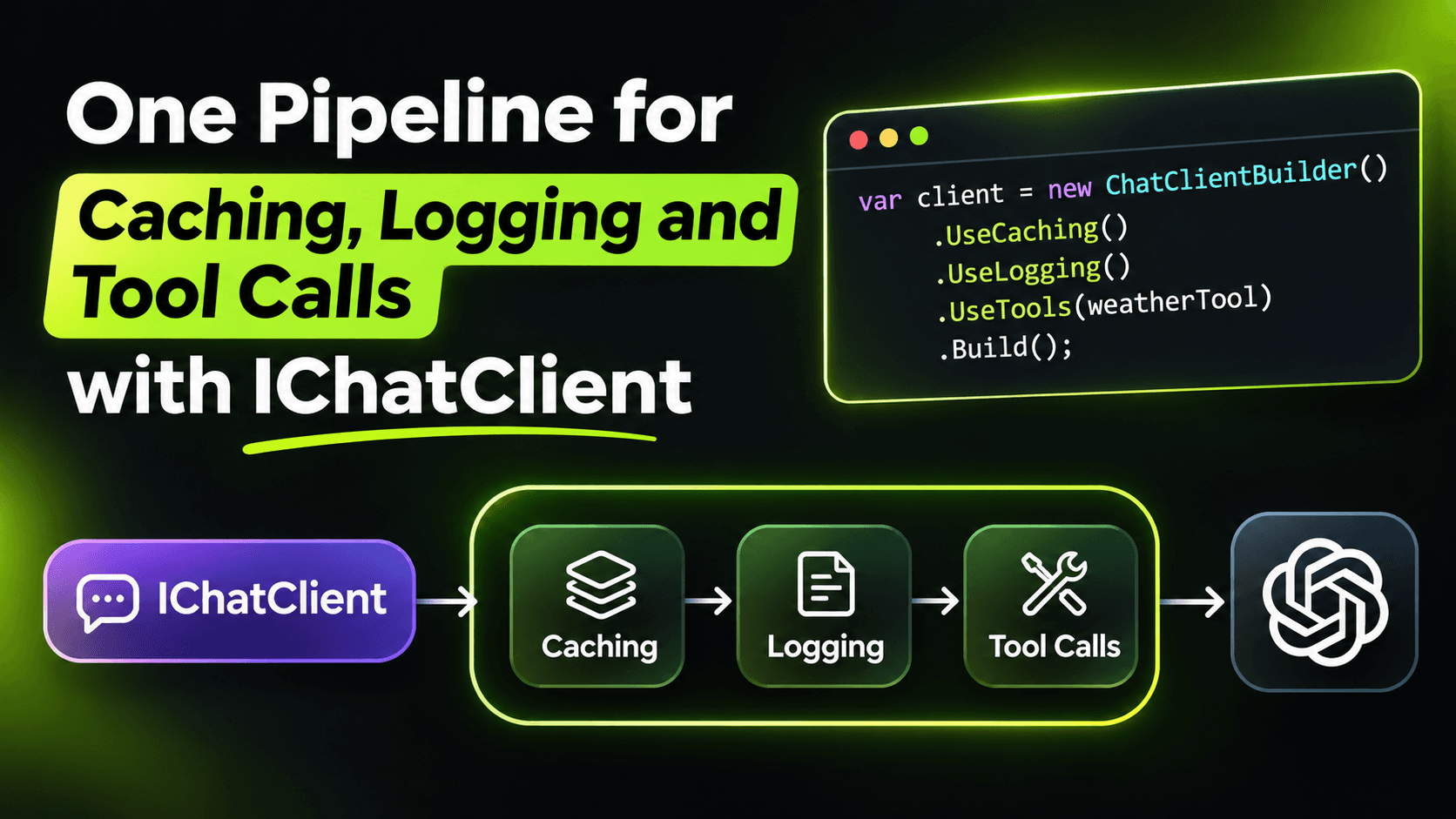
In the previous post we got typed objects back from an LLM. The next thing every real app needs is the boring stuff: caching so you don't pay for the same answer twice, logging so you can see what the model actually received, and tool calling so the model can look things up. You can write all of that around your LLM calls by hand. Or you can let Microsoft.Extensions.AI stack it for you.
The pipeline idea
IChatClient works like ASP.NET Core middleware. You start with the client that talks to the model, then wrap it in layers. Each layer is itself an IChatClient, so the code that calls it never knows how many layers are there.
Here's a minimal setup in an ASP.NET Core app, using Ollama locally:
using System.ComponentModel;
using Microsoft.Extensions.AI;
using OllamaSharp;

var builder = WebApplication.CreateBuilder(args);

builder.Services.AddDistributedMemoryCache();

builder.Services
    .AddChatClient(new OllamaApiClient(new Uri("http://localhost:11434"), "llama3.2"))
    .UseFunctionInvocation()
    .UseDistributedCache()
    .UseLogging();

var app = builder.Build();

app.MapPost("/ask", async (IChatClient chat, string question) =>
{
    var options = new ChatOptions
    {
        Tools = [AIFunctionFactory.Create(JobStats.CountOpenJobs)]
    };

    var response = await chat.GetResponseAsync(question, options);
    return response.Text;
});

app.Run();

static class JobStats
{
    [Description("Counts open job postings in a given city.")]
    public static int CountOpenJobs(string city) =>
        city.ToLowerInvariant() switch
        {
            "amsterdam" => 42,
            "berlin" => 37,
            _ => 0
        };
}
The endpoint just asks IChatClient for an answer. Caching, logging and the tool loop all happen inside the pipeline. If you swap Ollama for a hosted model next month, this endpoint doesn't change.
UseDistributedCache() and UseLogging() take their IDistributedCache and ILoggerFactory from DI, so in production you register Redis instead of the memory cache and nothing else moves.
The order is the whole trick
This is the part most samples skip. The first layer you register is the outermost one. A request goes down the list from top to bottom, and the response comes back up.
So these two pipelines look almost the same but behave very differently:
// A: cache outside the tool loop
.UseDistributedCache()
.UseFunctionInvocation()

// B: tool loop outside the cache
.UseFunctionInvocation()
.UseDistributedCache()
In A, the cache sees the user's question and the final answer. On a cache hit, the tool loop never runs. Your tool never gets called. If "how many open jobs in Amsterdam?" was answered yesterday with 42, it will say 42 today too, even if the real number is now 60.
In B, the tool loop is on the outside. Every time, the model's first call decides which tool to use (that call can come from the cache), then the tool actually runs and returns fresh data. Because the tool result is now part of the conversation, the next model call has different input, so it's a cache miss when the data changed and a cache hit when it didn't. You get savings without stale answers.
My rule: if any of your tools read live data, put UseFunctionInvocation above UseDistributedCache. Pipeline A is only safe when tool results never change, like a function that converts units.
Where logging goes matters too
Same logic for logging. In the setup above, UseLogging is the innermost layer, right next to the model. That means:
- Every log line is a real request to the model. Cache hits never reach it.
- You see each round trip of the tool loop separately, including the tool results the model received.
That's exactly what I want when I'm debugging cost or a strange answer. If you put logging at the top instead, you'd see one entry per user question, which is nicer for an audit log but hides what happened inside.
One catch: you won't see anything with the default log level. The logging client writes at Debug and Trace, so turn it on for that category:
{
  "Logging": {
    "LogLevel": {
      "Microsoft.Extensions.AI": "Trace"
    }
  }
}
Trace includes full prompts and responses. Great on your machine, not something you want in production logs if users type personal data into your app. Use Debug there.
Two small extras
Defaults in one place. ConfigureOptions lets you set defaults for every call that passes through the pipeline. For extraction tasks I usually want low randomness:
.ConfigureOptions(o => o.Temperature ??= 0)The ??= matters: a caller that sets its own temperature still wins.
Caching makes answers repeat. With a cache in front, the same question gives the exact same answer every time, even with a high temperature. That's what you want for extraction and classification. For a chat feature where users hit "regenerate", it's a bug. Don't put the cache in every pipeline by default; decide per use case.
What you get
Your endpoints talk to one interface. Behaviour like caching, logging, tool calling and default options lives in one place, in a clear order you can read top to bottom. And when something goes wrong in production, you can change the pipeline without touching business code.
Want the full build? Build MCP Servers in C#: Connect AI to Your .NET Apps shows you how to give AI access to your own .NET apps with an MCP server. Or get the weekly tips by email: /newsletter.