Sooner or later your MCP tools need a database. In .NET that usually means EF Core, and EF Core means a DbContext with a scoped lifetime. That's where MCP servers that worked fine with in-memory data start throwing strange errors.
The good news is that the SDK does the right thing by default. The bad news is that it's easy to undo it without noticing.
What the SDK does for you
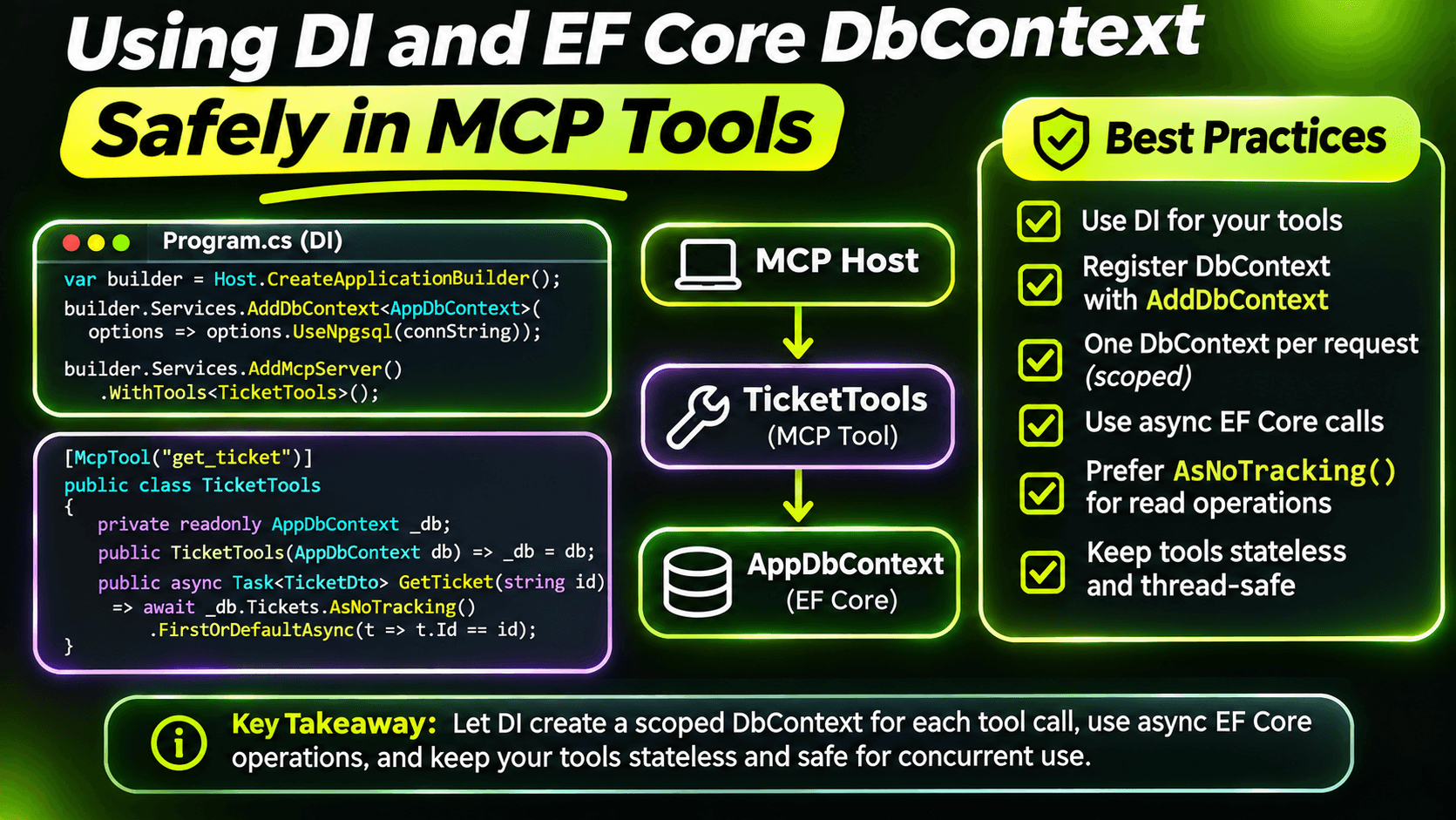
Every request your MCP server handles runs in its own DI scope. The option behind this is McpServerOptions.ScopeRequests, and it defaults to true. In practice it works like an ASP.NET Core controller: each tool call gets a new scope, any tool class with constructor dependencies is created inside it, and the scope is disposed when the call ends.
So this is safe:
builder.Services.AddDbContext<SupportDeskDb>(o =>
    o.UseNpgsql(builder.Configuration.GetConnectionString("SupportDesk")));

builder.Services.AddScoped<TicketService>();[McpServerToolType]
public sealed class TicketReadTools(SupportDeskDb db)
{
[McpServerTool(Name = "search_tickets", ReadOnly = true)]
[Description("""
Searches support tickets by words in the title.
Returns at most 10 tickets, newest first.
""")]
public async Task<IReadOnlyList<TicketSummary>> SearchTickets(
[Description("Words from the ticket title, e.g. 'printer offline'.")]
string query,
CancellationToken cancellationToken)
{
return await db.Tickets
.AsNoTracking()
.Where(t => t.Title.Contains(query))
.OrderByDescending(t => t.CreatedAt)
.Take(10)
.Select(t => new TicketSummary(t.Number, t.Title, t.Status))
.ToListAsync(cancellationToken);
}
}Every call gets its own DbContext. Two details are worth copying:
- The CancellationToken parameter is filled by the SDK, not by the model. It doesn't show up in the tool's schema. When the client cancels the call, the token fires and EF Core stops the query instead of finishing work nobody is waiting for.
- AsNoTracking on read tools. A tool call is short-lived, and nothing will be saved, so change tracking is pure overhead.
Mistake 1: a singleton that holds a scoped service
In the tenth post I registered TicketService as a singleton. With an in-memory store that was fine. With EF Core it's a bug: a singleton that takes a DbContext in its constructor captures one DbContext and keeps it for the life of the process.
The symptoms are confusing. Data looks stale, because the context caches what it already loaded. And sooner or later you get this:
A second operation was started on this context instance before a previous operation completed.That one appears because clients can call several tools at the same time. With a proper scope per call, each call has its own DbContext and parallel calls are fine. With a captured one, they all fight over the same instance.
The fix is a one-word change: AddScoped instead of AddSingleton for anything that touches a DbContext. The harder part is noticing the problem before production does.
The setting that catches it
.NET can detect these mistakes for you. It validates scopes when the app runs in the Development environment. And that's the trap with MCP servers: when an AI client starts your stdio server, it usually doesn't set DOTNET_ENVIRONMENT. Your server runs as Production, and validation is off, even on your own machine.
So I turn validation on explicitly, in every environment:
var builder = Host.CreateApplicationBuilder(args);

builder.ConfigureContainer(new DefaultServiceProviderFactory(new ServiceProviderOptions
{
    ValidateScopes = true,
    ValidateOnBuild = true
}));
With ValidateOnBuild, a singleton that depends on a scoped DbContext makes the host throw at startup, with a message that names both types. A clear failure at startup beats a random one during a tool call. The cost is a little extra work when the app starts, which for an MCP server is nothing.
Mistake 2: work that outlives the call
Sometimes a tool wants to do something after it returns. Send a notification email after resolving a ticket, for example:
// Don't do this
_ = Task.Run(() => notifier.SendResolvedEmailAsync(db, ticketNumber));
return result;
The tool returns, the SDK disposes the scope, and the DbContext is gone while the background task is still using it. You get an ObjectDisposedException, but only sometimes, depending on timing. Those are the worst bugs.
Work that runs after the call needs its own scope:
public sealed class TicketNotifications(IServiceScopeFactory scopes, ILogger<TicketNotifications> logger)
{
    public void QueueResolvedEmail(string ticketNumber) =>
        _ = Task.Run(async () =>
        {
            try
            {
                await using var scope = scopes.CreateAsyncScope();
                var notifier = scope.ServiceProvider.GetRequiredService<ResolvedEmailNotifier>();
                await notifier.SendAsync(ticketNumber);
            }
            catch (Exception ex)
            {
                logger.LogError(ex, "Failed to send resolved email for {Ticket}", ticketNumber);
            }
        });
}
TicketNotifications only depends on IServiceScopeFactory, which is a singleton, so it can be registered as one. For anything important, I'd go one step further and put the work in a queue processed by a hosted service, so it survives a restart. But even this small version fixes the lifetime bug.
Mistake 3: state in the tool class
Because tool classes are created per call, fields on them don't survive between calls. That's good, and it's the same lesson as the eleventh post: if something needs to live longer than one call, store it somewhere every instance can reach, like your database.
Checklist
- Leave ScopeRequests at its default.
- Register anything that uses a DbContext as scoped.
- Turn on ValidateScopes and ValidateOnBuild in every environment, because MCP clients rarely run you in Development.
- Take a CancellationToken in every tool that does I/O and pass it down.
- Use AsNoTracking in read-only tools.
- Give background work its own scope, or better, a queue.
And add a test for parallel tool calls with the in-memory setup from the previous post. It's the cheapest way to catch a shared DbContext before your users do.
Want the full build? Build MCP Servers in C#: Connect AI to Your .NET Apps shows you how to give AI access to your own .NET apps with an MCP server. Or get the weekly tips by email: /newsletter.